


 3-PH track light focusable, 36W, 30°-50°, black matt, 3000K, CRI92, DALI dimmable
 Subtotal: 159,00 €
DALI LED lighting, Low voltage 12V, 24V LED switches/controllers

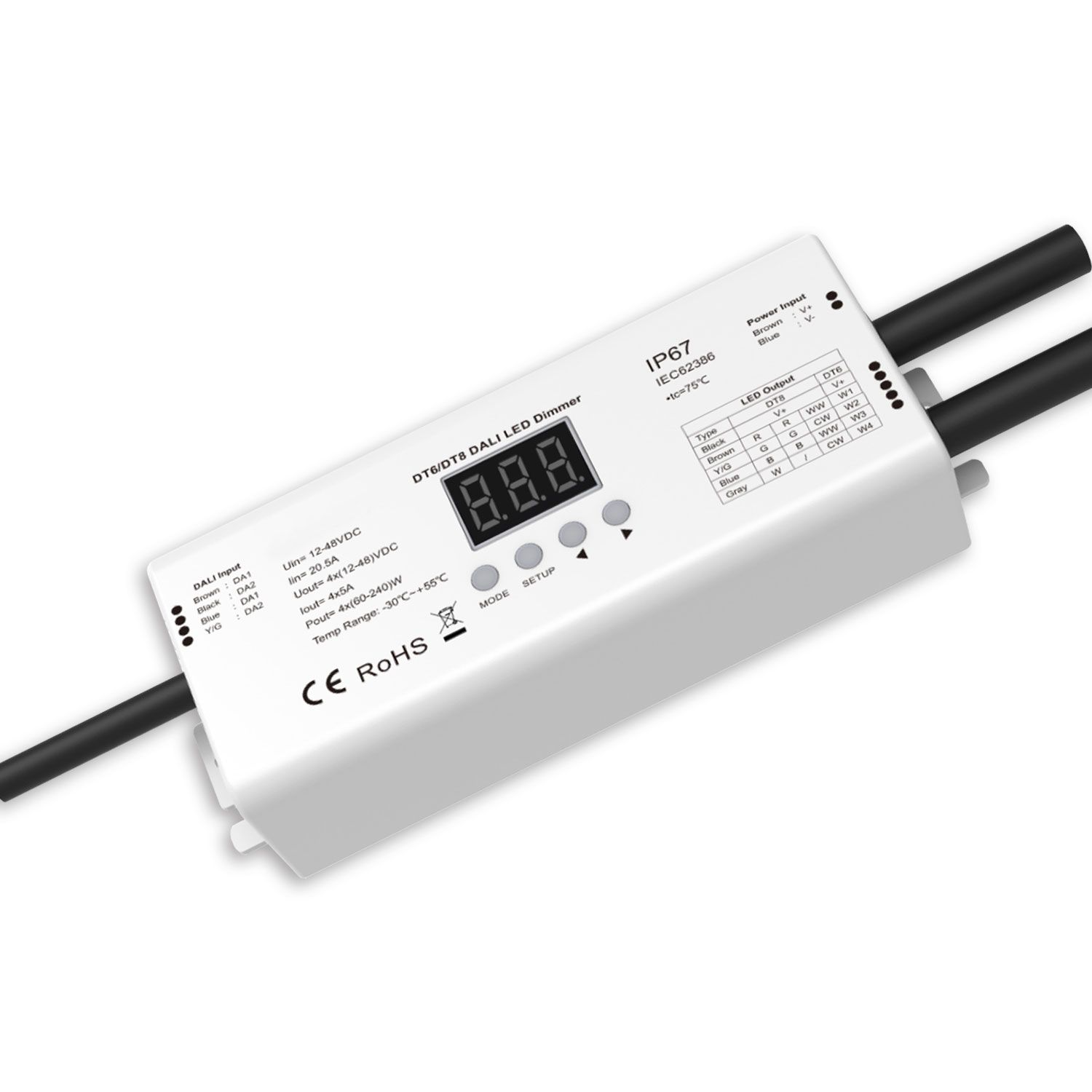
DALI-2 DT6 4 address/DT8 4-ch 1 address Multi-PWM dimmer, IP67, 12-24V 4x5A, 36-48V 4x3A
Out of stock status:
7-14 Days
DALI-2 DT6 4 address/DT8 4-ch 1 address Multi-PWM dimmer, IP67, 12-24V 4x5A, 36-48V 4x3A for light types: Single color , Color temperature TW, RGB, RGBW
99,99 €
Price without 24% VAT: 80,64 €
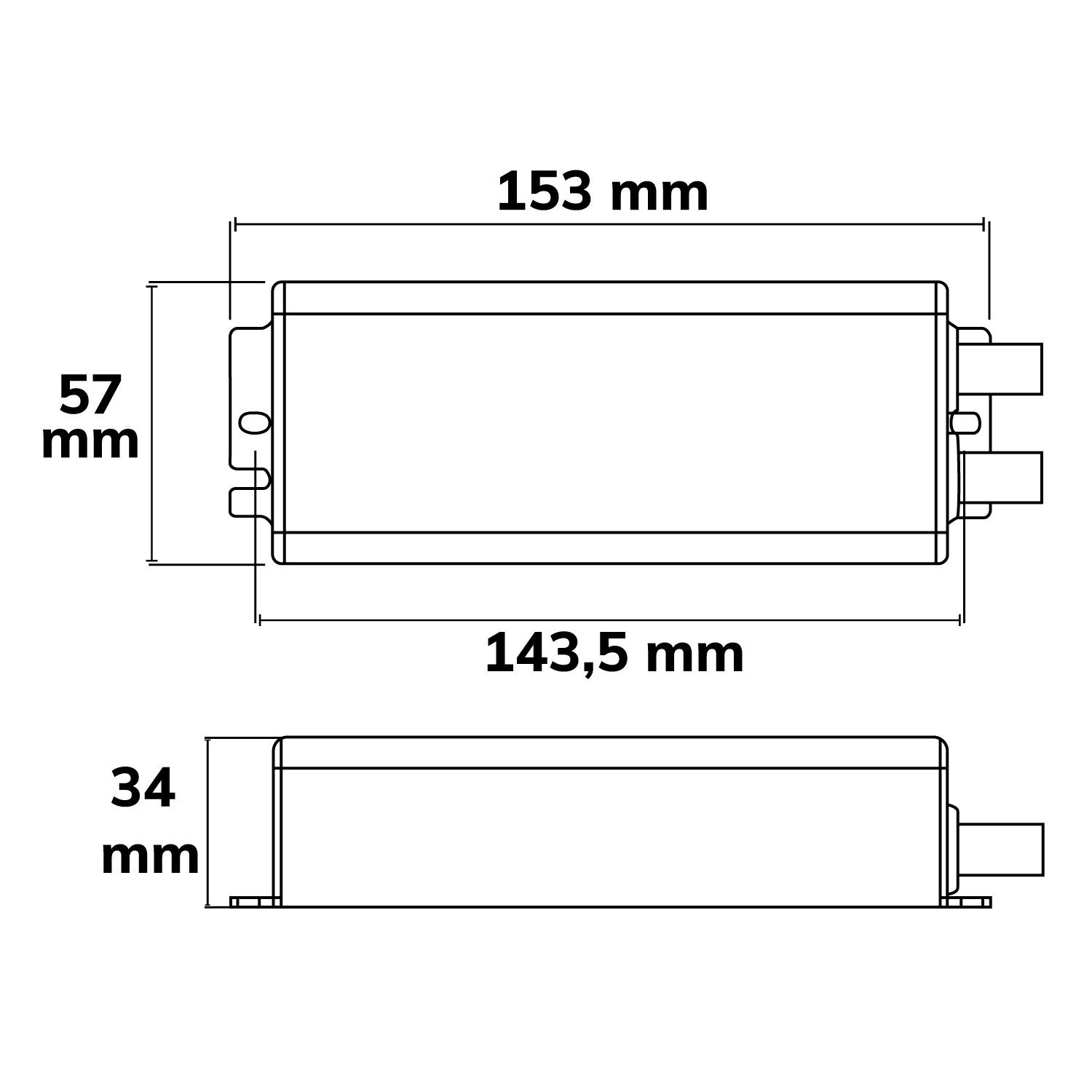
| Product description | DALI-2 DT6 4 addresses / DT8 4-channel 1 address Multi-PWM dimmer, IP67, 12-24V 4x5A, 36-48V 4x3A |
|---|---|
| GTIN – EAN | 9009377171666 |
| Features |    |
| Manual | Download
|
| Special features | PWM frequency 1000/2000/4000/8000/16000Hz adjustable |
| Protection class | IP67 |
| Weight in gramm | 492 |
| Length in mm | 153,0 |
| Width in mm | 57,0 |
| Height in mm | 34,0 |
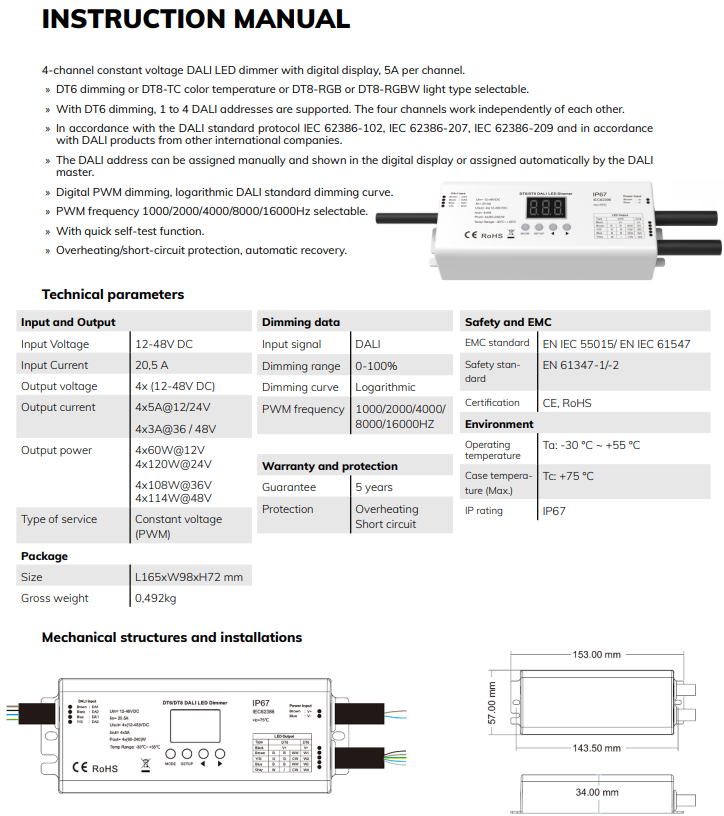
4-channel constant voltage DALI LED dimmer with digital display, 5A per channel.
» DT6 dimming or DT8-TC color temperature or DT8-RGB or DT8-RGBW light type selectable.
» With DT6 dimming, 1 to 4 DALI addresses are supported. The four channels work independently of each other.
» In accordance with the DALI standard protocol IEC 62386-102, IEC 62386-207, IEC 62386-209 and in accordance
with DALI products from other international companies.
» The DALI address can be assigned manually and shown in the digital display or assigned automatically by the DALI
master.
» Digital PWM dimming, logarithmic DALI standard dimming curve.
» PWM frequency 1000/2000/4000/8000/16000Hz selectable.
» With quick self-test function.
» Overheating/short-circuit protection, automatic recovery
Input and Output
Input Voltage 12-48V DC
Input Current 20,5 A
Output voltage 4x (12-48V DC)
Output current 4x5A@12/24V
4x3A@36 / 48V
Output power 4x60W@12V
4x120W@24V
4x10⁸W@36V
4x114W@48V
Type of service Constant voltage
(PWM)
Package
Size L165xW98xH72 mm
Gross weight 0,492kg
Dimming data
Input signal DALI
Dimming range 0-100%
Dimming curve Logarithmic
PWM frequency 1000/2000/4000/8000/16000HZ
Warranty and protection
Guarantee 5 years
Protection Overheating
Short circuit
Safety and EMC
EMC standard EN IEC 55015/ EN IEC 61547
Safety standard
EN 61347-1/-2
Certification CE, RoHS
Environment
Operating
temperature
Ta: -30 °C ~ +55 °C
Case temperature (Max.)
Tc: +75 °C
IP rating IP67
Dali DT8 Dimmer
Setting the light type
Instructions for setting the light type:
» When using it for the first time, please set the light type according to the application. Briefly press the MODE button to switch between the three setting options.
» If you briefly press the MODE button to enter the light type setting and then briefly press the SETUP button to set the light type, the display will flash.
» Briefly press the MODE button or Timeout for 10 seconds to exit the light type setting.
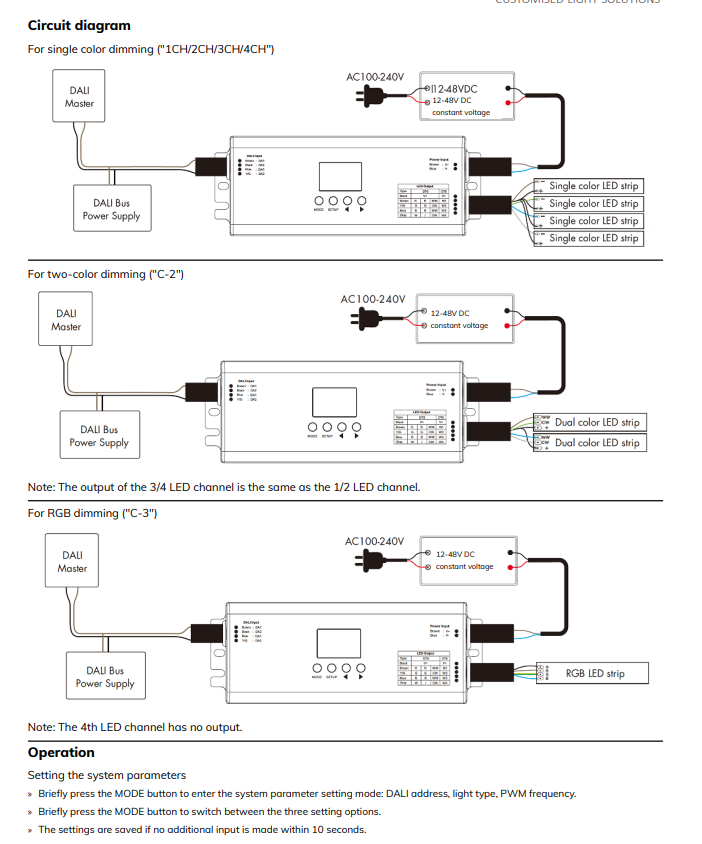
» With the setting “1CH” type, DT6 dimming, the dimmer occupies 1 DALI address, CH1, CH2, CH3, CH4 is the same DALI address, 4-channel output is the same.
» With the “2CH” setting, DT6 dimming, the dimmer occupies 2 DALI addresses, CH1, CH3 will have the same DALI address A, CH2, CH4 will have the same DALI address A+1.
» When set to “3CH”, DT6 dimming, the dimmer occupies 3 DALI addresses, CH1 is the DALI address A, CH2 is the DALI address A+1, CH3 is the DALI address A+2, CH4 is no DALI address and no output.
» With the “4CH” setting, DT6 dimming, the dimmer occupies 4 DALI addresses, CH1 is the DALI address A, CH2 is the DALI address A+1, CH3 is the DALI address A+2, CH4 is the DALI address A+3.
» With the “C-2” setting, DT8-TC dimming, the dimmer occupies 1 DALI address, CH1 and CH3 synchronized output WW (warm white), CH2 and CH4 synchronized output CW (cold white).
» With the “C-3” setting, DT8-RGB dimming, the dimmer occupies 1 DALI address, the 4th address is assigned to the dimmer. Channel is not output.
» With the “C-4” type setting, DT8-RGBW dimming, the dimmer occupies 1 DALI address, 4 channels are output independently of each other.
For example, the start DALI address is 32: If the type “1CH” is set, the dimmer occupies 1 DALI address and the address is 32. If the type
“2CH” is set, the dimmer occupies 2 DALI addresses and the address is 32,33. If the type “3CH” is set, the dimmer occupies 3 DALI addresses and the address is 32,33,34. If the type “4CH” is set, the dimmer occupies 4 DALI addresses and the address is 32,33,34,35. If the type
is set to “C-2”, the dimmer occupies 1 DALI address and the address is 32. If the type is set to “C-3”, the dimmer occupies 1 DALI address
and the address is 32. If the type is set to “C-4”, the dimmer occupies 1 DALI address and the address is 32.
Setting the DALI address via buttons
» Briefly press the MODE button to enter the DALI address setting (“A00-AFF”), and then briefly press the < or > button to prepare for setting the DALI start address, the digital display flashes, and then press the < or > button to set the DALI start address.
» Briefly press the MODE button or timeout 10s to end the setting of the start DALI address.
» The start DALI address can be assigned manually from 00-63-FF.
» In the factory setting, no DALI address is assigned to the dimmer and the digital display shows “AFF”. DALI address is assigned by DALI masters
» The DALI address can also be assigned automatically by a DALI master.
» Please read the operating instructions of the compatible DALI master for specific procedures.
» The digital display shows “AAU” when the DALI master assigns the address.
» After the address has been assigned, the digital display shows the DALI address “Axx”, xx is from 00 to 63.
» With the DT6 dimmer type with several channels, automatic address assignment by the DALI master can result in gaps between the addresses. In this case, the display shows the start address “Uxx”.
Setting the PWM frequency
» If you briefly press the MODE button to call up the PWM frequency setting (“Fxx”) and then briefly press the SETUP button to set the PWM
frequency, the digital display flashes.
» Briefly press the < or > button to switch between 1000Hz (“F10”), 2000Hz (“F20”), 4000Hz (“F40”) or 8000Hz (“F80”).Higher PWM frequencies reduce the output current and increase the operating noise, but are advantageous for camera recordings as there is no flickering.
» Briefly press the MODE button or timeout 10s to end the PWM frequency setting.
Restore factory default parameters
» Press and hold the < and > push buttons for 2 seconds to restore the factory settings and display “RES”.
» Factory default parameters: no DALI address is assigned, DT6 four-channel dimming, PWM frequency is 2000Hz.
» Press and hold the MODE and > button for 2 seconds to start the self-test. The channels are activated one after the other and then all
together.
Safety & Warnings
» DO NOT install the device when it is live.
» DO NOT expose the device to moisture.
Data
| Width (mm) | |
|---|---|
| Length (mm) | |
| Input voltage | |
| IP class | |
| Dimmable (adj. brightness) | |
| Brands | |
| In stock (Vana-Tartu mnt 79A) | No |
| Out of Stock Delivery Time From Supplier | 7-14 Days |
| Protocol | DALI, PWM |
| Light Color |
Based on 0 reviews
Only logged in customers who have purchased this product may leave a review.
Related products



You may also like…
-
-
60 x 60 cm, DALI LED lighting, LED Panels
LED Panel Busin. Line 600 UGR<19 2H/2H, 36W, frame white RAL 9016, neutral white, Push/DALI dimmable
 60 x 60 cm, DALI LED lighting, LED Panels
LED Panel Busin. Line 600 UGR<19 2H/2H, 36W, frame white RAL 9016, neutral white, Push/DALI dimmable
840 4600lm 4000K LED Panel Busin. Line 600 UGR<19 2H/2H, 36W, frame white RAL 9016, neutral white, Push/DALI dimmable
Out of stock status:7-14 Days
SKU: ISO-113507 -
CC Drivers for LED, DALI LED lighting, 0/1-10V DIMMABLE LED
LED CC transformer 100mA/180mA/270mA/350mA/440mA, 10W, Push/0-10V/DALI dimmable
 CC Drivers for LED, DALI LED lighting, 0/1-10V DIMMABLE LED
LED CC transformer 100mA/180mA/270mA/350mA/440mA, 10W, Push/0-10V/DALI dimmable
100mA(9-40V)/180mA(9-40V)/270mA(9-40V) 360mA(9-36V)/440mA(9-27V) LED CC transformer 100mA/180mA/270mA/350mA/440mA, 10W, Push/0-10V/DALI dimmable
Out of stock status:7-14 Days
SKU: ISO-114692









There are no reviews yet.